<?xml version="1.0" encoding="UTF-8"?>
<feed xmlns="http://www.w3.org/2005/Atom" xml:lang="en-US" xml:base="https://www.richardlord.net/">
<id>http://www.richardlord.net</id>
<title type="text">Richard Lord</title>
<subtitle type="text">Game Developer</subtitle>
<updated>2023-10-17T21:25:46Z</updated>
<link rel="alternate" type="text/html" href="https://www.richardlord.net" />
<link rel="self" type="application/atom+xml" href="https://www.richardlord.net/feed.xml" />
<author>
  <name>Richard Lord</name>
  <uri>https://www.richardlord.net</uri>
</author>
<rights>©1996-2023 Richard Lord</rights>

<entry>
<id>https://www.richardlord.net/blog/unity/finite-state-machines-in-unity.html</id>
<title>Finite State Machines in Unity</title>
<link rel="alternate" type="text/html" href="https://www.richardlord.net/blog/unity/finite-state-machines-in-unity.html" />
<updated>2018-03-13T20:20:00Z</updated>
<published>2018-03-13T20:20:00Z</published>
<category scheme="https://www.richardlord.net" term="Unity Game Engine" />
<summary type="text">There are many different solutions to managing finite state machines in Unity. I don’t intend to comment here on the goodness of any other solutions - the best solution is the one that works for you. I just want to tell you about how I manage state machines. If you find it useful please go ahead and copy me and if you have any suggestions for how to improve on this technique please tell me.</summary>
<content type="html" xml:base="https://www.richardlord.net/blog/unity/finite-state-machines-in-unity.html"><![CDATA[
<p>There are many different solutions to managing finite state machines in Unity. I don’t intend to comment here on the goodness of any other solutions — the best solution is the one that works for you. I just want to tell you about how I manage state machines. If you find it useful please go ahead and copy me and if you have any suggestions for how to improve on this technique please tell me.</p>
<p>There’s two parts to this, what I do and how I do it. All the code is <a href="https://github.com/richardlord/Unity-State-Machine">available on Github</a> if you would like to use it.</p>
<h2>Components as States</h2>
<p>The basic principle in my approach to state machines is to encapsulate each state in one or more components on the game object. There are two reasons for this</p>
<ol>
  <li>As a component, each state has full access to all the standard messages and other features of Unity’s API.</li>
  <li>The state of a game object exists intrinsically in its components, so the natural way to change a game object’s state is to change its components.</li>
</ol>
<p>I started off with the idea that each state is a component of the game object that the state machine exists on, which is clean and simple, but more recently I wanted more flexibility so now each state can comprise multiple components, and the components don’t have to be on the same game object as the state machine (although usually they are either there or on a child game object).</p>
<p>To implement this I have a single custom state machine component which manages the states, adding and removing components when entering and exiting states, and not much else.</p>
<h2>Why it’s not straightforward</h2>
<p>There was always a little wrinkle in this plan — components can’t exist outside of the game object on which they are created, so you can’t remove a component from a game object and then add it back later, removing it destroys it. It’s often desirable to maintain the internal data of a state when exiting it and re-entering it later so destroying the state component when exiting the state and creating a new one when re-entering it won’t work on it’s own. Over time I’ve used two different solutions for this.</p>
<p>When I first used components as states I was using Unity 3.5 and to keep things simple I would disable and enable components when changing state. The components for all the states existed on the game object all the time, and all but the current state were disabled. This works in most cases — the update methods don’t run on disabled components, and the <a href="https://docs.unity3d.com/ScriptReference/MonoBehaviour.OnEnable.html">OnEnable</a> and <a href="https://docs.unity3d.com/ScriptReference/MonoBehaviour.OnDisable.html">OnDisable</a> methods will be called when entering and leaving the state. However some specific messages are still received on disabled components - <a href="https://docs.unity3d.com/ScriptReference/MonoBehaviour.OnCollisionEnter.html">OnCollisionEnter</a> for example - so I had to be a bit careful with this technique.</p>
<p>When Unity 5.3 was released it included the new <a href="https://docs.unity3d.com/ScriptReference/JsonUtility.html">JsonUtility</a> class which provides a standard way to serialise objects, so since then I have serialised and removed components when leaving a state and deserialised and added them back when entering a state.</p>
<p>There is still a slight annoyance with this technique - it’s not possible to deserialise a component when creating it, instead you have to create a new instance and deserialise the old data into the new component. Because of this you have to avoid using the <a href="https://docs.unity3d.com/ScriptReference/MonoBehaviour.Awake.html">Awake</a> and <a href="https://docs.unity3d.com/ScriptReference/MonoBehaviour.OnEnable.html">OnEnable</a> methods in the state components because these methods are called before the deserialisation. The only initialisation method you can use in each state is the <a href="https://docs.unity3d.com/ScriptReference/MonoBehaviour.Start.html">Start</a> method, but I can work with that.</p>
<h2>The Implementation</h2>
<p class="center"><img src="/images/blog/StateMachine.png" width="414" height="481" alt="" /></p>
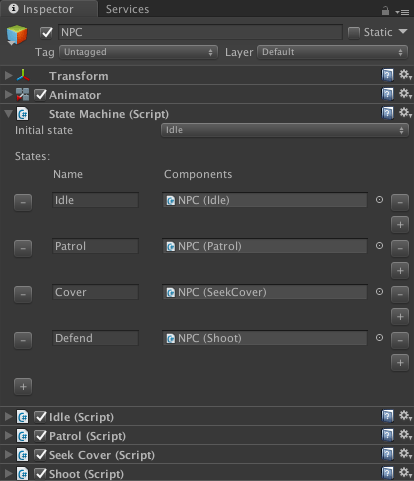
<p>The implementation is quite simple, consisting of a single <a href="https://github.com/richardlord/Unity-State-Machine/blob/master/Assets/StateMachine/StateMachine.cs">StateMachine</a> component and a <a href="https://github.com/richardlord/Unity-State-Machine/blob/master/Assets/StateMachine/Editor/StateMachineEditor.cs">custom inspector</a> to make it easier to use. The code and a simple example is available <a href="https://github.com/richardlord/Unity-State-Machine">on my Github repository</a>.</p>
<p>The <a href="https://github.com/richardlord/Unity-State-Machine/blob/master/Assets/StateMachine/StateMachine.cs">StateMachine</a> component has two configurable public properties, an array of states and the name of the initial state. Each state in the array has a name and an array of components for that state.</p>
<p>There is another public property which is the name of the current state, and a public method ChangeState(string) which takes the name of the new state as the parameter. On the surface there’s not much more to it than that. You could add more features but I’ve never needed them.</p>
<p>The StateMachine component also contains a bunch of private methods to handle the serializing and deserializing of the components and, like I said, there is a custom inspector for the class to help with the configuration.</p>
<p>To use it</p>
<ol>
  <li>Drop the StateMachine class on a game object.</li>
  <li>Add all the components for all the states into the scene and configure them how you wish.</li>
  <li>Configure the states in the StateMachine instance with the names of the states and references to the component instances for each state.</li>
</ol>
<p>When you enter the scene the components for all the states will be serialized and those not associated with the initial state will be removed. If you call ChangeState on the state machine then the components for the old state will be removed and the components for the new state will be added.</p>
<p>A component can be used in multiple states. If a component is in both the old and new states it is unchanged, it is not removed and re-added.</p>
<p>That’s all. If this is useful for you do let me know, and if you implement any improvements to it I would like to see them.</p>
<p>Have fun making your games.</p>
]]></content>
</entry>

<entry>
<id>https://www.richardlord.net/blog/unity/creating-scriptableobjects-in-unity.html</id>
<title>Creating ScriptableObjects in Unity</title>
<link rel="alternate" type="text/html" href="https://www.richardlord.net/blog/unity/creating-scriptableobjects-in-unity.html" />
<updated>2015-11-03T12:00:00Z</updated>
<published>2015-11-03T12:00:00Z</published>
<category scheme="https://www.richardlord.net" term="Unity Game Engine" />
<summary type="text">This is a short editor script that I use for creating instances of ScriptableObject classes in the Unity editor. Most scripts that create ScriptableObjects require you to add new code for each object type. This script does not. Select any class that extends ScriptableObject and choose Create->Instance to create an instance of that class.</summary>
<content type="html" xml:base="https://www.richardlord.net/blog/unity/creating-scriptableobjects-in-unity.html"><![CDATA[
<p>This is a short editor script that I use for creating instances of ScriptableObject classes in the Unity editor. Most scripts that create ScriptableObjects require you to add new code for each object type. This script does not. Select any class that extends ScriptableObject and choose Create->Instance to create an instance of that class.</p>

<pre>using UnityEngine;
using UnityEditor;
using System.IO;

public static class ScriptableObjectCreator {
  [MenuItem( "Assets/Create/Instance" )]
  public static void CreateInstance() {
    foreach( Object o in Selection.objects ) {
      if( o is MonoScript ) {
        MonoScript script = (MonoScript)o;
        System.Type type = script.GetClass();
        if( type.IsSubclassOf( typeof( ScriptableObject ) ) ) {
          CreateAsset( type );
        }
      }
    }
  }

  [MenuItem( "Assets/Create/Instance", true )]
  public static bool ValidateCreateInstance() {
    foreach( Object o in Selection.objects ) {
      if( o is MonoScript ) {
        MonoScript script = (MonoScript)o;
        System.Type type = script.GetClass();
        if( type.IsSubclassOf( typeof( ScriptableObject ) ) ) {
          return true;
        }
      }
    }
    return false;
  }

  private static void CreateAsset( System.Type type ) {
    var asset = ScriptableObject.CreateInstance( type );
    string path = AssetDatabase.GetAssetPath( Selection.activeObject );
    if( path == "" )  {
      path = "Assets";
    } else if( Path.GetExtension( path ) != "" ) {
      path = path.Replace( Path.GetFileName( AssetDatabase.GetAssetPath( Selection.activeObject ) ), "" );
    }
    string assetPathAndName = AssetDatabase.GenerateUniqueAssetPath( path + "/New " + type.ToString() + ".asset" );
    AssetDatabase.CreateAsset( asset, assetPathAndName );
    AssetDatabase.SaveAssets();
    EditorUtility.FocusProjectWindow();
    Selection.activeObject = asset;
  }
}</pre>

<p>To use the script, just add it to a folder called "Editor" inside your Unity assets folder.</p>

<p>The script isn't as sophisticated as <a href="https://github.com/liortal53/ScriptableObjectFactory">ScriptableObject Factory</a> but I prefer it because it is quicker to use - just right click on a class and choose Create->Instance.</p>

]]></content>
</entry>

<entry>
<id>https://www.richardlord.net/blog/unity/inversion-of-control-in-unity.html</id>
<title>Inversion of Control in Unity</title>
<link rel="alternate" type="text/html" href="https://www.richardlord.net/blog/unity/inversion-of-control-in-unity.html" />
<updated>2015-10-22T12:00:00Z</updated>
<published>2015-10-22T12:00:00Z</published>
<category scheme="https://www.richardlord.net" term="Unity Game Engine" />
<summary type="text">Many developers come to Unity from a background in object-oriented programming and look to use the same patterns in Unity that they used elsewhere. You don't neglect what you have learnt elsewhere just because you are using a different tool but sometimes you have to apply those lessons differently with the new tool. Unity has its own idea about how you should architect a game and before you start fighting against this it is best to try working with it - you will be a lot more productive if you do.</summary>
<content type="html" xml:base="https://www.richardlord.net/blog/unity/inversion-of-control-in-unity.html"><![CDATA[
<p>Many developers come to <a href="https://unity.com/">Unity</a> from a background in object-oriented programming and look to use the same patterns in Unity that they used elsewhere. You don't neglect what you have learnt elsewhere just because you are using a different tool but sometimes you have to apply those lessons differently with the new tool. Unity has its own idea about how you should architect a game and before you start fighting against this it is best to try working with it - you will be a lot more productive if you do.</p>

<h2>Everything is a MonoBehaviour</h2>

<p>The first principle of working with Unity's architecture is that everything should be a <a href="https://docs.unity3d.com/ScriptReference/MonoBehaviour.html">MonoBehaviour</a>. Which means everything should be a component on a game object. Even the stuff that doesn't represent a feature of a specific game object, like code that initialises the scene or code that saves the current game state - just create an empty game object, call it something sensible like "scene controller" or "services" and add these components there.</p>

<p>If your code is a MonoBehaviour then Unity knows about it, the Unity editor knows about it, and the tools that Unity provides will work with it. If your code is not a MonoBehaviour then it sits outside of Unity's knowledge and ability to manage it and you can't configure it in the Unity editor.</p>

<p>(Scriptable Object is an exception to this but you probably don't need that.)</p>

<h2>The editor</h2>

<p>There is one disadvantage to making everything a MonoBehaviour - you have to work with two IDEs. The first is your coding tool - usually MonoDevelop or Visual Studio - and the second is the Unity editor. You can't spend your day entirely inside your coding tool of choice, you have to mess with the Unity editor as well. But that's okay. You create the components in your code editor and you configure them in the Unity editor, just like you would any other asset.</p>

<h2>Inversion of Control</h2>

<p>All of which is an introduction to my real reason for writing this article - a lot of developers new to Unity struggle with inversion of control, or more precisely the apparent lack of it. You may come from any programming background, but if you are used to having a dependency injection container or service locators you may well regard Unity as inferior and you may even decide to create <a href="http://strangeioc.github.io/strangeioc/">a dependency injection container for it</a>. Before you do, take a look at what Unity does out of the box.</p>

<p>In common use inversion of control falls into three categories -</p>

<ol>
<li>Service locators</li>
<li>Dependency injection</li>
<li>Events</li>
</ol>

<p>Unity has tools for all of these. Some of them may not look like the tools you are accustomed to but they have much the same goals and produce similar results.</p>

<h2>Service locators</h2>

<p>Unity's service locator is the Find… methods of the Object class - <a href="https://docs.unity3d.com/ScriptReference/Object.FindObjectOfType.html">FindObjectOfType</a> and <a href="https://docs.unity3d.com/ScriptReference/Object.FindObjectsOfType.html">FindObjectsOfType</a>. These methods will find the components in the current scene that match a particular type, and if you followed my advice above then all of your code is inside components of some object or objects in the scene. So if, for example, you have a component called "ScoreService" that submits scores to your server, just call FindObjectOfType&lt;ScoreService&gt;() to locate it.</p>

<p>Some developers complain that the find methods are slow, but</p>

<ol>
<li>They will rarely impact the performance of your game</li>
<li>If they do impact performance, use dependency injection instead</li>
</ol>

<h2>Dependency injection</h2>

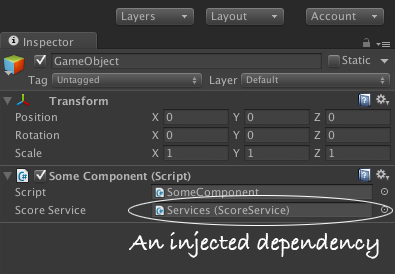
<p>You know that thing in the Unity editor where you drag one game object onto a property of another to provide the component instance for that property. That's dependency injection. It may feel a bit strange configuring it in the editor, but it's a lot easier to understand than the pages of code or XML used to configure most dependency injection containers.</p>

<p align="center"><img alt="" src="/images/unity/dependency_configure.png" width="395" height="274" /></p>

<p>Unfortunately configuring dependencies in the Unity editor is so easy you won't feel as smart as you did when you used <a href="https://spring.io">Spring</a> or <a href="https://github.com/robotlegs/robotlegs-framework">Robotlegs</a> - even your designers can configure this dependency injection.</p>

<h2>Events</h2>

<p>There's three ways to handle callbacks into an object.</p>

<h3>1. SendMessage</h3>

<p>Unity has had the <a href="https://docs.unity3d.com/ScriptReference/GameObject.SendMessage.html">SendMessage</a> method since the dawn of time. It works but is less than ideal because it requires matching a string in the caller to a method name in the callee, which requires setting global rules about the naming of methods (or losing any benefit of SendMessage over just calling the method directly).</p>

<h3>2. Actions</h3>

<p>If you code in C#, you get <a href="https://msdn.microsoft.com/en-us/library/system.action.aspx">Actions</a> for free as part of the language. Actions are delegates that don't return a value and as such are great for event dispatching. Unfortunately, the Unity editor doesn't understand them so they have to be configured in code, but that's what you thought you wanted anyway isn't it.</p>

<h3>3. Events</h3>

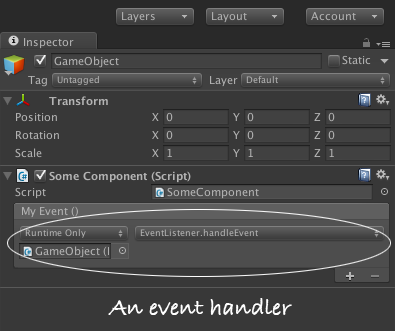
<p>Since the introduction of Unity's new GUI in version 4.6 Unity includes an <a href="https://docs.unity3d.com/ScriptReference/Events.UnityEvent.html">event system</a> that can be configured in the editor - so if a game object dispatches an event you can configure the listeners for that event inside the editor rather than in code. It feels odd at first, but if you embrace the idea of building your components in a code editor and configuring them in the Unity editor then, as with the dependency injection, this will make absolute sense. Try it.</p>

<p align="center"><img alt="" src="/images/unity/event_configure.png" width="395" height="331" /></p>

<h2>Conclusion</h2>

<p>Unity has it's own tools for managing inversion of control. They are unlike the tools in most web frameworks but they do the same job and in some cases they are even easier to use.</p>

<p>The first game I wrote in Unity was a struggle as we broke all of the above rules to code the game the way we did with other tools. With my second and subsequent games I follow the Unity patterns and I build games faster and have more fun doing it.</p>
]]></content>
</entry>

<entry>
<id>https://www.richardlord.net/freak-factory/blog/why-freak-factory.html</id>
<title>Why Freak Factory?</title>
<link rel="alternate" type="text/html" href="https://www.richardlord.net/freak-factory/blog/why-freak-factory.html" />
<updated>2015-09-24T12:00:00Z</updated>
<published>2015-09-24T12:00:00Z</published>
<category scheme="https://www.richardlord.net" term="Freak Factory" />
<summary type="text">You may be surprised if I tell you that Freak Factory is about life, but it is.

Every time you play Freak Factory you lose, eventually. You may prolong the game, you may get a high score, but eventually you will lose. Losing is inevitable and every Freak you make reduces the space you have, reduces how much game you have left. While you play it the game doesn't get harder, it gets less. With every move you make you see the end approaching.</summary>
<content type="html" xml:base="https://www.richardlord.net/freak-factory/blog/why-freak-factory.html"><![CDATA[
<p>You may be surprised if I tell you that <a href="/freak-factory/">Freak Factory</a> is about life, but it is.</p>

<p>Every time you play Freak Factory you lose, eventually. You may prolong the game, you may get a high score, but eventually you will lose. Losing is inevitable and every Freak you make reduces the space you have, reduces how much game you have left. While you play it the game doesn't get harder, it gets less. With every move you make you see the end approaching.<!--more--></p>

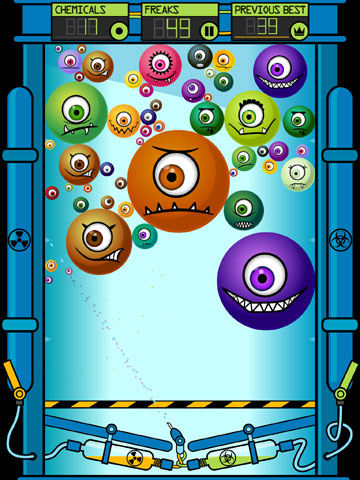
<p>But the end doesn't matter. The game isn't about the end, just as it isn't about the start. It's about all the bits in between. What Freaks are you making? What score will you achieve? What inspired, lucky or surprising moves will you make? Will you remember this game?</p>

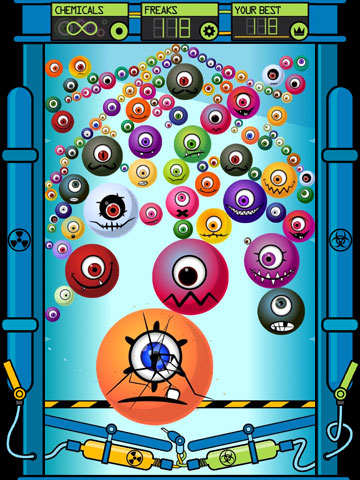
<p align="center"><img alt="" src="/freak-factory/images/press/ss3.jpg" width="360" height="480" /></p>

<p>And then there's the obvious stuff. After they are born in the machine, the Freaks do two things - they move and they grow. Life.</p>

<p>A friend's son said he didn't like that they're called Freaks, because they're not Freaks, they're lovely. I said Freaks can be lovely too. I asked him which is his favourite Freak, he said "Archer, because sometimes he feels sad and he doesn't know why." Not just any Freak, a depressed one.</p>

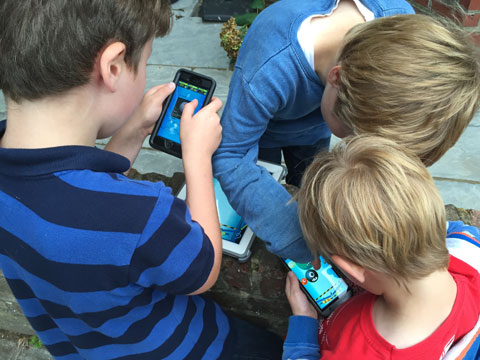
<p>Freak Factory appeals to all demographics. It has a 4.9 out of 5 rating on the iOS store. Some of our most avid players are seniors and some of our most avid players are young children. It's a game for generations to play together.</p>

<p align="center"><img alt="" src="/freak-factory/images/press/boys_playing.jpg" width="480" height="360" /></p>

<p>A friend tells me he loves it because he's better than his teenage children. It's the only game where he gives them tips. Another friend slugs it out with his teenage daughter. His best score is 88, her's is 93. For now. That'll change soon.</p>

<p>Freak Factory doesn't require fast reactions, it requires planning, thought, a steady mind. It's hardest to play when you're distracted. So much can go wrong.</p>

<p>Some shots in Freak Factory exhibit "sensitive dependence on initial conditions". Which means a small change in your shot will cause a big change in the outcome. Which also means "it's easy to mess up". The problem with many plans.</p>

<p>You'll never get a perfect game. If you restart every time you make a mistake, every time your game doesn't go according to plan, then you will never finish a game. The theoretical maximum score is a few hundred, but the practical maximum is about 150. My best is 118.</p>

<p align="center"><img alt="" src="/freak-factory/images/press/me118.jpg" width="360" height="480" /></p>

<p>Getting a high score means accepting your mistakes, discovering the new opportunities they present, making a new plan. John Lennon sang "Life is what happens to you while you're busy making other plans". So is a big Freak in the middle of your factory.</p>

<p>Sometimes you decide to be cautious, and sometimes you go for the big shot, the wild shot, the exciting shot, because it might just work. Because games exist to be explored, to be played. Because life should be interesting.</p>

<p><a href="/freak-factory/">Play Freak Factory here.</a></p>
]]></content>
</entry>

<entry>
<id>https://www.richardlord.net/blog/presentations/choreographer-game-designer.html</id>
<title>Lessons I Learnt as a Choreographer and Apply as a Game Designer</title>
<link rel="alternate" type="text/html" href="https://www.richardlord.net/blog/presentations/choreographer-game-designer.html" />
<updated>2015-07-22T12:00:00Z</updated>
<published>2015-07-22T12:00:00Z</published>
<category scheme="https://www.richardlord.net" term="Presentations" />
<summary type="text">In this session at the Develop conference in Brighton I presented seven important lessons that I learnt as a choreographer that are still important to me as a game designer. I accompanied each lesson with the story of how I learnt it and an example of how it might apply in game design.</summary>
<content type="html" xml:base="https://www.richardlord.net/blog/presentations/choreographer-game-designer.html"><![CDATA[
<p>Presented at</p>
<ul>
<li><a href="http://www.developconference.com/">Develop Brighton</a>, 16 July 2015</li>
</ul>
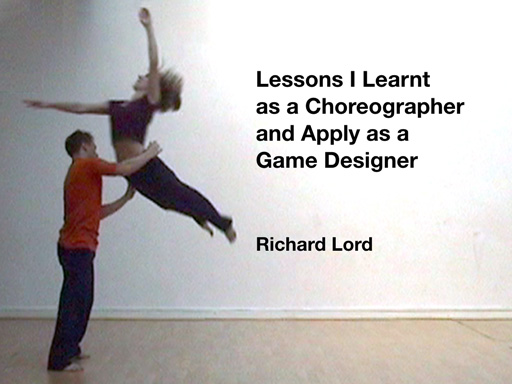
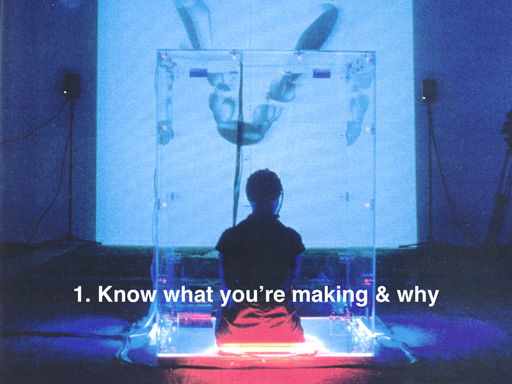
<p>In this session I presented seven important lessons that I learnt as a choreographer that are still important to me as a game designer. I accompanied each lesson with the story of how I learnt it and an example of how it might apply in game design.</p>

<p>The slides from the presentation contain very little information but they are here in case you're interested.</p>

<p>
<img src="/images/develop2015/Develop2015_1.jpg" width="512" height="384" /><br />
<img src="/images/develop2015/Develop2015_2.jpg" width="512" height="384" /><br />
<img src="/images/develop2015/Develop2015_3.jpg" width="512" height="384" /><br />
<img src="/images/develop2015/Develop2015_4.jpg" width="512" height="384" /><br />
<img src="/images/develop2015/Develop2015_5.jpg" width="512" height="384" /><br />
<img src="/images/develop2015/Develop2015_6.jpg" width="512" height="384" /><br />
<img src="/images/develop2015/Develop2015_7.jpg" width="512" height="384" /><br />
<img src="/images/develop2015/Develop2015_8.jpg" width="512" height="384" /><br />
<img src="/images/develop2015/Develop2015_9.jpg" width="512" height="384" />
</p>
]]></content>
</entry>

<entry>
<id>https://www.richardlord.net/blog/choreography-games/seeing-whats-really-there.html</id>
<title>Seeing what's really there</title>
<link rel="alternate" type="text/html" href="https://www.richardlord.net/blog/choreography-games/seeing-whats-really-there.html" />
<updated>2015-06-26T12:00:00Z</updated>
<published>2015-06-26T12:00:00Z</published>
<category scheme="https://www.richardlord.net" term="Lessons I Learnt as a Choreographer and Apply as a Game Designer" />
<summary type="text">This blog post was originally published on the Develop:Brighton website on 26 June 2015.

I remember as a choreographer at dance school showing my choreography teacher my first dance piece. I'd spent a term making this dance, working with three dancers who were studying with me. This was extra-curricular activity but I wanted to make this dance and I felt good about it. So, in search of praise I asked my choreography teacher, Ingegerd Lonnroth, to look at it.</summary>
<content type="html" xml:base="https://www.richardlord.net/blog/choreography-games/seeing-whats-really-there.html"><![CDATA[
<p><i>This blog post was originally published on the <a href="http://developconf.blogspot.com/2015/06/seeing-whats-really-there.html">Develop:Brighton</a> website on 26 June 2015.</i></p>

<p>I remember as a choreographer at dance school showing my choreography teacher my first dance piece. I'd spent a term making this dance, working with three dancers who were studying with me. This was extra-curricular activity but I wanted to make this dance and I felt good about it. So, in search of praise I asked my choreography teacher, Ingegerd Lonnroth, to look at it.</p>

<p>We gathered in a dance studio. I started the music and the dancers danced. I watched the dance and I watched my choreography teacher, my gaze flicking between the two. Then, unexpectedly, my chest tightened and my stomach flipped. This dance was not good. Specifically, the section I was watching was not good. And I was acutely embarrassed. How had I not seen this before? I looked across at Ingegerd but she was impassive. Had she noticed?</p>

<p>When the dancers finished Ingegerd said something supportive and encouraging, to them and to me. Then she said &quot;Show me again the section about a third of the way through, starting from the upstage right corner.&quot; Yes, she'd noticed.</p>

<p>I learnt two things that day.</p>

<ol>
<li>That Ingegerd is a very perceptive critic, a skill I made full use of during my time at dance school.</li>
<li>That it is very difficult to see what you have made the way the audience will see it.</li>
</ol>

<p>When I look at a dance I've choreographed or a game I've designed the tendency is to see what I want to see, to see the work as I intend it to be, not as it is. Faults are ignored as my imagination smooths them over and delivers to me the experience that I expect, because I expect it.</p>

<p>My tool for overcoming this hazard is in that early experience with Ingegerd. Show it to someone whose opinion matters to you. Watch it with them. Imagine what it looks like for them. Imagine what they are thinking. Don't wait for them to tell you, don't rely on their feedback. Empathise and feel it for yourself.</p>

<p>In theory you can do this without the other person there but it is hard. I find that their presence, watching the dance or playing the game, and my anxiety over their reaction helps me to empathise, to see the work as it really is.</p>

<p>With my new game, <a href="/freak-factory/">Freak Factory</a>, I have shown it to numerous people. Family, friends, other developers. In many cases I watch the screen over their shoulder, imagining what they are thinking and feeling, and I smile as my chest tightens, my stomach flips, and I add another issue to my to-do list. It's not traditional user testing and for you it may not work, but it helps me a lot.</p>
]]></content>
</entry>

<entry>
<id>https://www.richardlord.net/blog/choreography-games/what-makes-a-good-collaboration.html</id>
<title>What Makes a Good Collaboration?</title>
<link rel="alternate" type="text/html" href="https://www.richardlord.net/blog/choreography-games/what-makes-a-good-collaboration.html" />
<updated>2015-06-17T12:00:00Z</updated>
<published>2015-06-17T12:00:00Z</published>
<category scheme="https://www.richardlord.net" term="Lessons I Learnt as a Choreographer and Apply as a Game Designer" />
<summary type="text">This blog post was originally published on Gamasutra on 17 June 2015.

Before I became a game developer I was an independent contemporary dance choreographer with my own dance company. And in my 14 years creating dances, and a further 14 creating games, I've experienced all sorts of collaborations. For me, there are three key ingredients to a good collaboration.</summary>
<content type="html" xml:base="https://www.richardlord.net/blog/choreography-games/what-makes-a-good-collaboration.html"><![CDATA[
<p><i>This blog post was originally published on <a href="http://www.gamasutra.com/blogs/RichardLord/20150617/246365/What_Makes_a_Good_Collaboration.php">Gamasutra</a> on 17 June 2015.</i></p>

<p>Before I became a game developer I was an independent contemporary dance choreographer with my own dance company. And in my 14 years creating dances, and a further 14 creating games, I've experienced all sorts of collaborations. For me, there are three key ingredients to a good collaboration.</p>

<h2>Skill</h2>

<p>All collaborators should bring skills to the project that wouldn't otherwise be present. There's no point collaborating with someone if you're better than them at everything. A collaborator is your equal. You respect and value each other's skills and by working together you make something better than either of you could make alone.</p>

<h2>Understanding</h2>

<p>All collaborators should understand what you are making. The game is the reason you are working together. You must agree on what the game is and who it is for so you can all focus your skills on delivering that experience to the players.</p>

<h2>Trust</h2>

<p>All collaborators must trust each other. Without trust there will be no collaboration - the untrusted collaborator will be watched and controlled and any influence they might have over the game will be blocked.</p>

<p>I recall one dance production I created where the costume designer showed me designs that I hated. So I stopped working with her. It wasn't her fault, I should never have asked her to work with me because I didn't trust her.</p>

<p>But there was another dance production where the costume designer showed me designs that I hated and I continued working with her. We even went with her designs that I hated, because I trusted her. And when I saw the finished costumes they were fantastic, perfect for the dance. That's why I needed a costume designer.</p>

<h2>And now</h2>

<p>These three ingredients, skill, understanding and trust, went through my mind back in March when <a href="https://www.prawnsoda.co.uk">Brian Roberts</a> sent me a visual design for my new game. I hadn't asked him to do this, I had planned for my first game as an indie to be small and manageable. Simple graphics, simple sounds, interesting gameplay. Build and learn, I thought, I'll find collaborators for the next project, after I've had time to get to know the indie scene in London. This would be my game.</p>

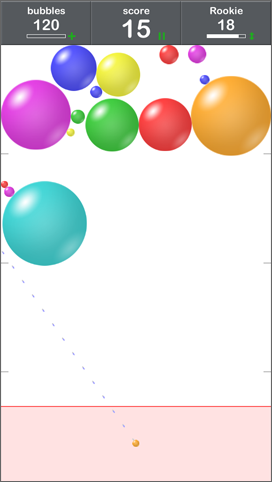
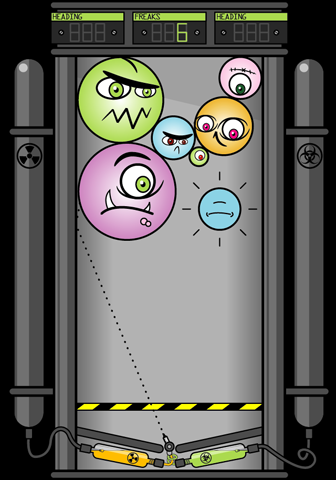
<p><img alt="" height="482" src="/freak-factory/images/press/prototype.png" width="272" /></p>

<p>But I showed a prototype of the game to some friends in the pub and Brian sent me an email later that night - &quot;Sorry I didn't say goodbye. Really like your new game so I thought I'd have a (slightly drunk) blast at some graphics.&quot; Attached was a picture of the main screen of the game, reinterpreted as an industrial space in which slightly cute, slightly scary creatures are created, and you, the player, are the one creating them. It was great.</p>

<p><img alt="" src="/freak-factory/images/press/original.png" /></p>

<p><i>(Here's a tip - if you see a game you want to work on, ask the team creating it - they may say yes.)</i></p>

<p>So I spent a sleepless night deliberating.</p>

<p>I have never created a piece of art without collaborating. In dance you usually have dancers, composers, costume &amp; set designers. Then as a game developer I've never made &quot;my&quot; game, I've always worked on other people's games. Which is why I quit my job - to make my games.</p>

<p>I intended to make this game alone, and now Brian wanted to collaborate on it.</p>

<p>Because I knew Brian, I knew he had the skills. From the graphics he sent me, he clearly understood the game. But collaboration works two ways - I would be giving Brian the power to influence my game. It wouldn't even be my game any more, it would be our game. That's why the trust has to be there.</p>

<p>By the morning I had decided and I sent Brian an email - &quot;I like that a lot. Do you want to talk about doing all the graphics for the game?&quot; We got together, had a great conversation and Brian became the visual designer for the game. And it has been great working together. The game has benefited from his designs and from his feedback. It's a much richer visual experience and it'll be released soon.</p>

<p>Here's the video trailer featuring the final graphics.</p>

<iframe width="560" height="315" src="https://www.youtube.com/embed/M8Rtc-p30fk?rel=0" frameborder="0" allowfullscreen></iframe>
<br />

<p>So there we are, my ingredients for good collaboration - Skill, Understanding and Trust.</p>

<p><a href="/freak-factory/">Freak Factory</a> will be out on 27th July 2015 on iOS &amp; Android. You can read more about it on the game's <a href="/freak-factory/">website</a>.</p>
]]></content>
</entry>

<entry>
<id>https://www.richardlord.net/freak-factory/blog/bubble-pack-becomes-freak-factory.html</id>
<title>Bubble Pack becomes Freak Factory</title>
<link rel="alternate" type="text/html" href="https://www.richardlord.net/freak-factory/blog/bubble-pack-becomes-freak-factory.html" />
<updated>2015-06-10T12:00:00Z</updated>
<published>2015-06-10T12:00:00Z</published>
<category scheme="https://www.richardlord.net" term="Freak Factory" />
<summary type="text">I've been heads down building stuff for Bubble Pack for a while now, which is why I haven't talked about it much. A lot of news has built up.

A New Name

The game now has its final name and art style. The name is Freak Factory. What were bubbles are now little critters called Freaks, and what was a simple box is now a factory in which you make these Freaks. And if you don't keep them contained they will escape and the game ends. Trust me, it all makes sense and looks wonderful.</summary>
<content type="html" xml:base="https://www.richardlord.net/freak-factory/blog/bubble-pack-becomes-freak-factory.html"><![CDATA[
<p>I've been heads down building stuff for Bubble Pack for a while now, which is why I haven't talked about it much. A lot of news has built up.</p>

<h2>A New Name</h2>

<p>The game now has its final name and art style. The name is <b>Freak Factory</b>. What were bubbles are now little critters called Freaks, and what was a simple box is now a factory in which you make these Freaks. And if you don't keep them contained they will escape and the game ends. Trust me, it all makes sense and looks wonderful.<!--more--></p>

<p>I didn't design the graphics, that was <a href="https://www.prawnsoda.co.uk">Brian Roberts</a> who I used to work with at Stick Sports. There's a little story about how we ended up working together on Freak Factory, which I will tell you next time. For now suffice to say I'm very pleased to be collaborating with him. The graphics he has made are really excellent.</p>

<h2>Trailer</h2>

<p>The best place to see the new graphics is in the trailer for the game. Here it is.</p>

<iframe width="560" height="315" src="https://www.youtube.com/embed/M8Rtc-p30fk?rel=0" frameborder="0" allowfullscreen></iframe>

<br />
<h2>Release Date</h2>

<p>The game is nearing completion and we are planning to release it next month. I'll post more detailed information as the date approaches.</p>

<hr />
]]></content>
</entry>

<entry>
<id>https://www.richardlord.net/freak-factory/blog/bubble-pack-update-monetisation.html</id>
<title>Bubble Pack update - monetisation</title>
<link rel="alternate" type="text/html" href="https://www.richardlord.net/freak-factory/blog/bubble-pack-update-monetisation.html" />
<updated>2015-02-23T12:00:00Z</updated>
<published>2015-02-23T12:00:00Z</published>
<category scheme="https://www.richardlord.net" term="Freak Factory" />
<summary type="text">It used to be the only question about monetising your game was how much to charge, and you could leave that decision until quite late in the development. But in this era of free-to-play we have to ask ourselves how we propose to charge for the game, and we have to ask early because the decision can have significant ramifications for the game.

How to charge for your game is sometimes very simple and other times very hard. With Bubble Pack I have always known that I want the initial download to be free. There are two reasons for this</summary>
<content type="html" xml:base="https://www.richardlord.net/freak-factory/blog/bubble-pack-update-monetisation.html"><![CDATA[
<p>It used to be the only question about monetising your game was how much to charge, and you could leave that decision until quite late in the development. But in this era of free-to-play we have to ask ourselves how we propose to charge for the game, and we have to ask early because the decision can have significant ramifications for the game.</p>

<p>How to charge for your game is sometimes very simple and other times very hard. With Bubble Pack I have always known that I want the initial download to be free. There are two reasons for this<!--more--></p>

<ol>
<li>For my first game I want the low barrier to entry that free provides.</li>
<li>It's too easy for someone else to make a free clone of this game.</li>
</ol>

<p>However, I also don't want to use advertising in the game. Advertising on mobile is horrible - a preponderance of shitty looking adverts that make your game look cheap and nasty. Most advertising is not the sort of stuff I want to present to people who play my games. If I could fill the game with high quality brand advertising I'd be happy, but instead we get clickbait and ads for other people's games.</p>

<p>Free and no advertising leaves me squarely in the free-to-play space, not necessarily the most comfortable place to be. What I really want to do is an old-fashioned try-before-you-buy model. So here's the plan…</p>

<ul>
<li>The game will be free to download.</li>
<li>There will be a single non-consumable in-app-purchase.</li>
<li>There will be an energy system - a limit on the number of bubbles you can play with at any time.</li>
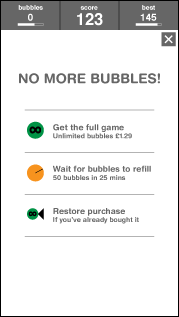
<li>When you run out of bubbles you can wait for them to refill or pay once to remove the limit.</li>
</ul>

<p>And that's it. I have tried to ensure the game can be played for free forever, but the energy system must necessarily be a little annoying or no-one will pay. Please forgive me for that. My goal is for an honest, simple model of one payment to get the full game. If the game is good enough, maybe I can significantly beat the normal 4% conversion on free-to-play.</p>

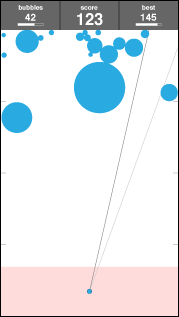
<p>I added the number of bubbles the player has to the wireframes, and an overlay for buying the game.</p>

<p align="center">
<img src="/images/bubblepack/BubbleMoney1.png" width="179" height="317" /> &nbsp;
<img src="/images/bubblepack/BubbleMoney2.png" width="179" height="317" />
</p>

]]></content>
</entry>

<entry>
<id>https://www.richardlord.net/freak-factory/blog/bubble-pack-update-gameplay.html</id>
<title>Bubble Pack update - gameplay</title>
<link rel="alternate" type="text/html" href="https://www.richardlord.net/freak-factory/blog/bubble-pack-update-gameplay.html" />
<updated>2015-02-17T12:00:00Z</updated>
<published>2015-02-17T12:00:00Z</published>
<category scheme="https://www.richardlord.net" term="Freak Factory" />
<summary type="text">I have been playing around with the gameplay for Bubble Pack, adjusting it to get the right difficulty balance. There are lots of small adjustments that can be made to make the game a little easier or a little harder and I also tried a couple of bigger changes.

First I tried letting the player set the power at which the ball is thrown. Unfortunately, this made the game far too easy whilst also making the controls more complicated, so I ditched that idea.</summary>
<content type="html" xml:base="https://www.richardlord.net/freak-factory/blog/bubble-pack-update-gameplay.html"><![CDATA[
<p>I have been playing around with the gameplay for Bubble Pack, adjusting it to get the right difficulty balance. There are lots of small adjustments that can be made to make the game a little easier or a little harder and I also tried a couple of bigger changes.</p>

<p>First I tried letting the player set the power at which the ball is thrown. Unfortunately, this made the game far too easy whilst also making the controls more complicated, so I ditched that idea.<!--more--></p>

<p>I also tried removing each bubble after a period of time. The lifespans of bubbles got longer as the game progressed, starting at fifteen moves for the first bubble. So after it had been in play for fifteen moves, the first bubble would pop, opening up more space in the game area for other bubbles. Because the lifespan increased during the course of the game, the game got harder and harder.</p>

<p>This meant it was possible to recover from a bad mistake early in the game, but it also made the early part of the game boring for good players because the bubbles you placed then would be gone later in the game so didn't really matter. So I dropped this idea too and returned to the pure game.</p>

<p>But I did make a lot of smaller adjustments.</p>

<p>I tweaked the power of the shot until it gives the player lots of interesting options.</p>

<p align="center"><img src="/images/bubblepack/BubbleGameplay2.png" width="290" height="514" /></p>

<p>I can think of a number of strategies to try to get a high score and I'm unsure which will be the best, and that's good.</p>

<p>I have also repeatedly tweaked the pace of the bubble to make the game a little faster, a little faster, a little faster, a little slower. The game is still calm, but there's less waiting around for a shot to finish.</p>

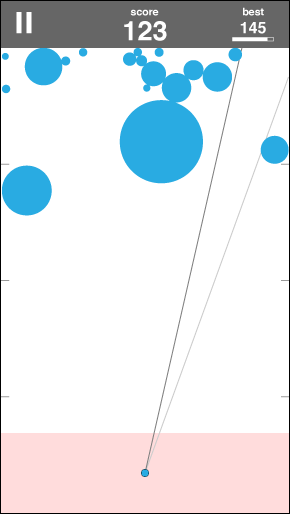
<p>I added markers around the edge of the play area to help the player with targeting.</p>

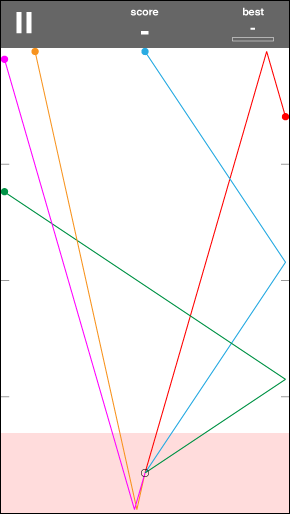
<p>I made the direction targeting for the bubble into a line to make it clearer (some testers were confused that the dots indicated the size of the bubble when in fact they were much smaller).</p>

<p>I also added a second line indicating the direction of the previous shot, which makes planning your shot based on what happened last time a lot easier.</p>

<p align="center"><img src="/images/bubblepack/BubbleGameplay1.png" width="290" height="514" /></p>

<p>These small changes make it a little easier for a beginner player to improve, but to get a great score still requires good spatial planning and reasoning.</p>

<p>When playing the game the control rests squarely with the player. There is no randomness or erratic behaviour in the game to ruin your plans. When you succeed it is your success and when you fail it is your mistake, which leaves every player thinking they can do better next time.</p>

<p>My best score so far is 62. My scores are quite erratic ranging from about 30 to the aforementioned 62 - it's easy to make a mistake and ruin your well laid plans. :twisted:</p>

]]></content>
</entry>


</feed>